
Manage school rosters, accounts, groups, Microsoft Teams classes, and Google Classroom classes from one locally managed data source.
ClassSync is a school roster management solution for IT administrators and teachers who manage Microsoft 365 and Google Workspace. It uses one locally managed roster for teacher, student, class, and enrollment information and supports creating and updating accounts, groups, Microsoft Teams classes, and Google Classroom classes from the same school data.
ClassSync reduces repetitive account and class registration work, especially at the beginning of a school term. A single roster can be used across both platforms, helping schools maintain consistent user, class, and enrollment information.
Roster data is processed and stored on the administrator’s local device rather than on ClassSync’s external servers, helping schools maintain direct control of teacher and student information.
How ClassSync Manages School Rosters and Accounts
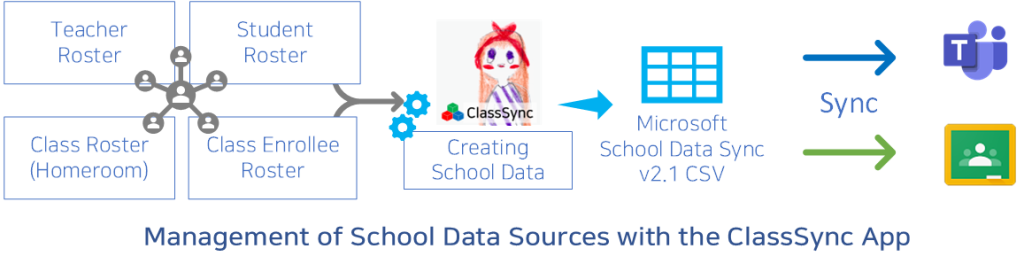
ClassSync uses one locally managed roster as the source for teacher, student, class, and enrollment information. School administrators can use this roster to create and update Microsoft 365 and Google Workspace accounts, groups, Microsoft Teams classes, and Google Classroom classes.
OneID standardizes each user’s sign-in ID across Microsoft and Google services, helping schools apply consistent account and roster management rules. Updates to the local roster can be reflected across supported cloud services without maintaining separate lists for each platform.
The school roster remains under the administrator’s control on the local device. Selected account, group, and class data is sent directly from the administrator’s device to Microsoft 365 or Google Workspace through authorized APIs. ClassSync does not store the school roster on ClassSync’s external servers.
ClassSync Features for School Administrators
Who Should Use ClassSync?
- School IT administrators and technology coordinators : Manage Microsoft 365 and Google Workspace accounts, groups, teacher and student rosters, and digital classes from one locally maintained data source.
- Teachers responsible for account and class administration : Prepare class groups and digital classroom rosters without repeatedly registering the same users in separate Microsoft and Google systems.
- Schools preparing for a new term : Update a single roster and reuse the same school data for supported account, group, enrollment, Microsoft Teams, and Google Classroom operations.
ClassSync Capabilities at a Glance
| Capability | ClassSync Support |
| Microsoft 365 account and group management | Supported |
| Google Workspace account and group management | Supported |
| Microsoft Teams class management | Supported |
| Google Classroom class management | Supported |
| Local roster storage | Supported |
| SDS CSV v2.1 file generation | Supported |
| SAML SSO account provisioning | Supported |
| OneDrive, Teams, and Google Drive file transfer | Supported |
Microsoft SDS CSV v2.1 Support
- ClassSync generates CSV files in the Microsoft School Data Sync v2.1 format for use with Microsoft 365 Education.
- ClassSync can also reuse the same locally managed roster data to create and manage Google Classroom classes. Google Classroom synchronization is provided by ClassSync and is separate from Microsoft School Data Sync.
SAML-based SSO Enablement
- Supports building a SAML-based Single Sign-On (SSO) environment by using Microsoft or Google as the Identity Provider (IdP).
- Provides account and user attribute provisioning and synchronization required for SSO.
Security & Privacy
- School roster data is stored on the administrator’s local device rather than on ClassSync’s external servers. Selected account, group, and class information is sent directly to Microsoft 365 or Google Workspace through authorized APIs when an administrator performs a management operation.
- This local-storage design helps schools maintain direct control of teacher and student roster data. Each school remains responsible for using ClassSync in accordance with its own policies and applicable privacy requirements.
Use Cases
- IT administrators or staff requiring local control of roster data : School roster information is stored and managed on the administrator’s local device rather than on ClassSync’s external servers, helping schools maintain direct administrative control of teacher and student information.
- Schools using both Microsoft Teams and Google Classroom : ClassSync helps maintain consistent account, group, class, and enrollment information across Microsoft and Google platforms.
- IT administrators managing large numbers of user accounts and class groups : Reuse one locally managed roster for supported account, group, enrollment, and class management operations.
- Teachers and staff responsible for roster management : Maintain accurate class rosters and user information across supported Microsoft and Google services.
Frequently Asked Questions About School Roster Management
Q1. What is school roster management?
School roster management is the process of organizing and maintaining teacher, student, class, and enrollment data. ClassSync uses one locally managed roster to support account, group, Microsoft Teams class, and Google Classroom class management.
Q2. Can ClassSync manage both Microsoft 365 and Google Workspace?
Yes. ClassSync is designed to manage school accounts, groups, and class rosters across Microsoft 365 and Google Workspace from the same roster source.
Q3. Who can use ClassSync?
ClassSync is intended for school IT administrators, technology coordinators, and teachers responsible for managing school accounts, rosters, groups, and digital classes.
Q4. Does ClassSync store student and teacher data on an external server?
No. School roster data is processed and stored on the administrator’s local device rather than on ClassSync’s external servers. Selected changes are sent directly to Microsoft 365 or Google Workspace through authorized APIs.
Q5. Does ClassSync support Microsoft School Data Sync?
ClassSync can generate CSV files in the Microsoft School Data Sync v2.1 format for use with Microsoft 365 Education. The same locally managed roster can also be used separately by ClassSync to create and manage Google Classroom classes.
Microsoft Education Solution Partner & School Data Sync Advanced Partner
Join Us as a Global Partner for ClassSync!
We are seeking partners worldwide to distribute ClassSync licenses and provide technical support. Let’s grow together in the global EdTech market.
Fair and Sustainable Collaboration for Shared Growth and Success